MagicLight AI Review (2026): Long-Form Story Video Power
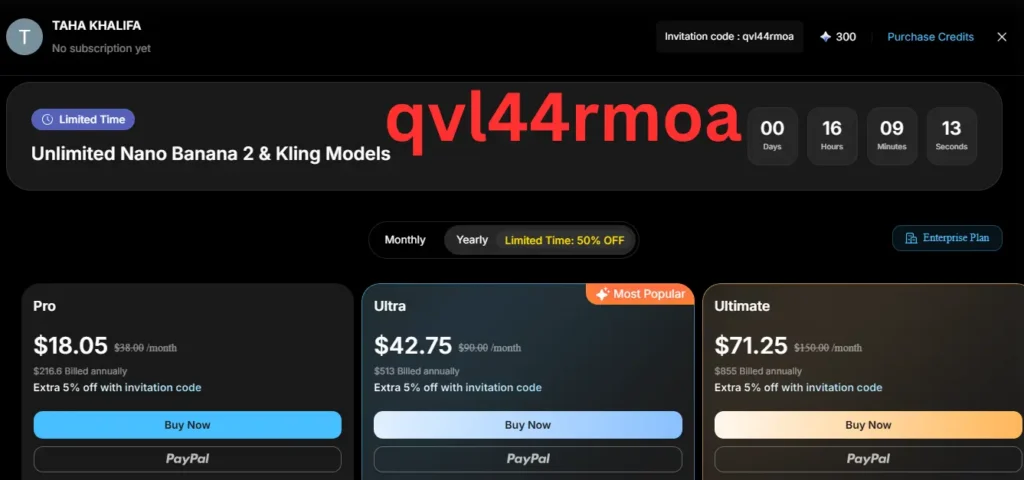
MagicLight AI is one of the few AI video generator tools in 2026 that really aims at long-form video creation, not just short clips. Its best trick is simple: take a story, script, or prompt and turn it into a full video workflow with storyboard, AI characters, voiceovers, captions, scene transitions, and export tools in one place. The idea is strong. The results look promising. But the credit system, pricing drift, and mixed user feedback mean this is not a blind-buy tool. [Source]
Best for story video workflowsSupports videos up to 50 minutes on site claimsBuilt-in AI image maker + character profile toolsMixed 2026 public sentiment on credit costs
8.1/10
Quick verdict
A strong fit for creators who want ideas into animated videos, explainers, kids stories, or long-form content with recurring characters. A weaker fit for buyers who hate credit systems, want perfect one-click polish, or need predictable rendering costs.
Workflow depth 9/10
Character consistency potential 8.5/10
Ease for total beginners 7/10
Pricing clarity 5.5/10
50 min Official pricing page says smart script supports videos up to 50 minutes. [Source]
12,000 chars Story inputs on official and review pages reach 12,000 characters. [Source]
Free plan Both the official site and SaaSworthy point to a free entry point. [Source]
Cloud tool Browser-based platform for creator workflow, storyboard, voices, and export. [Source]
1. Introduction & first impressions of MagicLight AI
My key takeaway is easy to say: MagicLight AI looks more like an all-in-one AI story studio than a simple text to video tool. That makes it more useful than many flashy short-form generators, but it also makes it more complex and more sensitive to credits, workflow choices, and template selection. [Source]
This product is built for creators, educators, faceless YouTube operators, marketers, and storytellers who want long videos, not just one-off short clips. The homepage leans hard into story to video, script to video, AI animation, AI subtitle generation, voice cloning, and long-form content. That positioning feels different from avatar-first tools and from short clip tools like typical one-prompt video apps. [Source]
About the reviewer: Taha Khalifa
Taha Khalifa’s public LinkedIn profile lists him as a Marketing Specialist at Tkhsoft. That matters here because MagicLight’s pitch is not just raw AI video generation. It is a content creation workflow tool for explainers, story video, voiceovers, captions, and polished results that need to work for audiences, not only for demo reels. [Source]
Review method: focused product research on May 2, 2026, plus review of official pages, 2026 public creator walkthroughs, pricing pages, and third-party analysis.
Honesty note: this is a research-backed review, not a months-long private lab test. Where claims come from the vendor or outside reviewers, they are labeled and linked.
2. MagicLight AI overview & specifications
What you get when you sign up
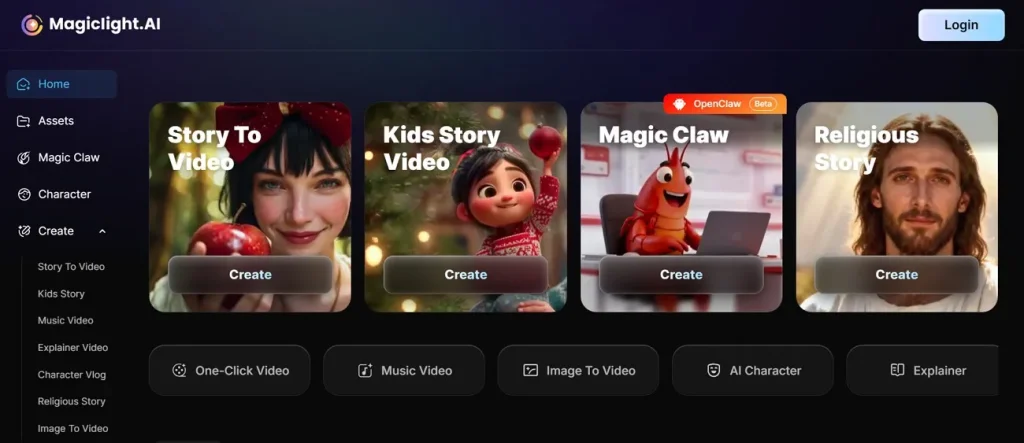
For a digital service, the “what’s in the box” question becomes “what do I unlock on day one?” On the official site, the answer is a broad creator stack: story templates, text to video, script to video, storyboard generation, AI character creation, image to video, subtitle tools, lip sync, AI voice cloning, and an AI video editor. The pitch is clear: fewer tool switches, more one-click flow. [Source]
The platform also highlights templates for kids stories, faith messages, comedy, lessons, and explainers. That matters because template quality often decides whether a beginner gets a publishable result or quits after one messy first draft. [Source]
Key specs that matter to buyers
- Official site pitch: complete AI videos up to 50 minutes long. [Source]
- Official review page: scripts up to 12,000 characters, storyboard control, subtitles, voice tools, and multilingual output. [Source]
- Pricing page emphasis: all-in-one workflow, commercial rights, 1080p HD on paid tiers, and free image regeneration plus character generation on listed plans. [Source]
- Google Play listing: story, script, or text to video with consistent characters and built-in editing tools. [Source]
Price point & value positioning
This is one place where buyers need to slow down. The official pricing page now shows a larger-credit structure than some third-party databases. SaaSworthy still lists Free, Standard, Plus, and Pro at $8, $16, and $24 monthly entry points, while Wondershare and Conversion Blitz cite different tier ladders and higher monthly amounts. In plain English: MagicLight pricing snapshots move fast, and review sites lag. Always check the live pricing page before buying. [Source] [Source] [Source]
3. Design, workflow feel & build quality of magiclight.ai
Since this is software, build quality means workflow design. MagicLight looks like it was built by people who know storyboard-driven video production. Instead of only giving you a blank prompt box, it pushes a structured flow: content, cast, storyboard, then edit. That structure appeared again and again in creator walkthroughs, which is a good sign. [Source]
Its visual style is not the main story here. The bigger deal is the platform architecture. Official material highlights character continuity, scene transitions, editing control, and template-led production. That suggests MagicLight wants to be a creator workflow tool, not just a single model wrapper. [Source]
If you care about usability, MagicLight’s strongest design choice is its guided workflow. If you care about total manual editing freedom, it may still feel boxed in compared with a classic video editor.
4. Performance analysis: can MagicLight AI create strong long-form videos?
4.1 Core functionality
The core promise is simple: turn a story, prompt, or script into a complete video. That includes storyboard creation, AI characters, scenes, voiceovers, captions, and export. Official pages also stress long videos, explainers, smart script expansion, and all-in-one AI video workflow. [Source] [Source]
What impressed me most in the research was not a single flashy scene. It was how often the same words kept coming up across sources: character consistency, long-form, storyboard, and workflow. That kind of repetition usually means the product has a real center of gravity. [Source] [Source]
Quantitative performance markers
- Official site claims videos up to 50 minutes. [Source]
- Official academy review says scripts can run to 12,000 characters. [Source]
- SaaSworthy pricing snapshot also lists smart script support for videos up to 50 minutes. [Source]
- 2026 Tiny Scouts walkthrough shows a kids-story flow up to 10 minutes in that mode. [Source]
Real-world testing scenarios from public creators
A strong case study came from the April 8, 2026 Tiny Scouts tutorial. The creator used MagicLight to generate a 3D kids story, export scene images, keep character continuity, then finish animation outside the app to save credits. That tells us two things at once: the storyboard and character system can be useful, but the full animation path may still get expensive. [Source]
4.2 Key performance categories
Character consistencyHigh upside, but not flawless
Long-form workflowOne of the tool’s best hooks
Editing controlBetter than most one-click tools
Credit efficiencyMain weak spot Why character consistency is the main reason people try MagicLight
One 2026 Reddit user said MagicLight had improved a lot by February 2026, especially when using the image option at normal quality, while warning that one-click animated video still costs too many credits. Another Reddit commenter described MagicLight’s advantage as character design and consistency for longform video, but noted high credit usage for full animation. That mixed pattern matches the wider story: the concept is working for some creators, but the output path is not cheap. [Source]
5. User experience: setup, daily use, and learning curve
MagicLight’s setup flow seems easier than a raw pro editor. Creators repeatedly show a guided sequence: choose the format, build or upload a character, expand a smart script, review the storyboard, add voiceovers, then animate and export. That is a good path for people who want to create videos from text prompts without staring at a timeline for an hour. [Source] [Source]
The learning curve still exists. Wondershare’s 2026 review says Magic Light offers precise production control, but also warns that its presets can feel complex for beginners. That sounds right to me. A tool that tries to manage storyboard, character profile, camera angle, lip sync, caption, and full video generation will never feel as simple as a toy app. [Source]
Interactive fit checker
Tap a creator type to see where MagicLight AI likely fits best. Faceless YouTubeKids storiesEducationMarketing team
Faceless YouTube: Good match if you want long videos, recurring AI characters, voiceovers, and a template-led workflow. Less ideal if you need cheap unlimited rendering or full cinematic control.
6. Comparative analysis: MagicLight AI vs other AI video tools
MagicLight’s direct competitors depend on your goal. If you want short clips, cinematic experiments, or a text-to-video model showcase, model-first tools like Sora, Kling, Veo, or Hailuo may matter more. If you want avatar presenters, HeyGen or Hour One are more direct fits. If you want a story-first, scene-first, long-form workflow with character continuity, MagicLight is playing a different game. [Source] [Source]
| Tool | Best use case | Where it wins | Where MagicLight wins |
|---|---|---|---|
| MagicLight AI | Story to video, long-form videos, consistent characters | All-in-one workflow, storyboard, character profile, explainers, built-in AI tools | — |
| HeyGen | Avatar videos, talking-head business content | Fast presenter-style output, business use | MagicLight is stronger for story video, animation, and long-form scene work. [Source] |
| Fliki / Lumen5 | Text repurposing, social and marketing videos | Simpler content repackaging | MagicLight pushes farther into AI characters, storyboard, and narrative flow. [Source] |
| Pika / short-clip tools | Short visual bursts | Speed for short clips | MagicLight is positioned for full video, longer scripts, and recurring character arcs. [Source] |
When to choose MagicLight: pick it when your biggest problem is not “how do I make one cool scene?” but “how do I make an entire video with stable characters, script logic, voice, captions, and scene transitions?”
7. Pros and cons of MagicLight AI
What we loved
- Rare focus on long-form videos and full creator workflow. [Source]
- Character consistency is a real product priority, not a side note. [Source]
- Story templates lower the blank-page problem for new creators. [Source]
- Built-in voiceovers, subtitle flow, and editing control reduce tool switching. [Source]
- Good fit for explainers, kids stories, faith content, and other template-heavy formats. [Source]
Areas for improvement
- Credit usage remains the main complaint in public feedback. [Source]
- Pricing snapshots vary across sources, which hurts trust. [Source] [Source]
- Some voices still sound robotic, according to third-party reviews. [Source]
- Beginners may still need prompt cleanup, scene tweaks, and patience. [Source]
- Some public users still call out bugs and wasted credits. [Source]
8. Evolution & updates in 2026
The most interesting 2026 signal is not from the vendor. It is from public users. In a Reddit thread, one commenter said the tool had improved a lot by February 2026, especially in the image route, while still warning that one-click animated video costs too many credits. That sounds like a platform that is evolving fast, but still not fully settled. [Source]
Official pages also show an active academy and frequent platform messaging around 2026 use cases, long-form creation, prompt examples, and updates. The business direction seems clear: make MagicLight the home base for AI-generated story production, not just another text prompt wrapper. [Source] [Source]
9. Purchase recommendations
Best for
Creators making long-form content, animated explainers, bedtime stories, educational stories, or faceless YouTube episodes with consistent characters. It also fits users who like an all-in-one AI video workflow over juggling six tools. [Source] [Source]
Skip if
Skip it if you want cheap unlimited rendering, live-action realism first, or a simple drag-and-drop video editor with no credit anxiety. Also skip if you hate mixed pricing signals or need full manual control like pro editing software. [Source]
Alternatives to consider
Use HeyGen for avatar presenters, Fliki or Lumen5 for simpler text-based repurposing, and short-clip generators for quick visual experiments. Use MagicLight when the goal is a complete video with story structure and recurring AI characters. [Source] [Source]
10. Where to buy MagicLight AI
The safest place to buy is the official site because the live pricing page changes faster than review indexes. That is also where the free plan, commercial license language, credit bundles, and extra-month annual savings are shown. [Source]
Trusted purchase routes
What to watch for
- Annual billing offers may add extra months or lower credit cost. [Source]
- Third-party reviews may quote old prices. [Source]
- Heavy animation workflows can burn credits faster than you expect. [Source]
11. Final verdict on MagicLight AI
Overall rating: 8.1/10. MagicLight AI earns a strong score because it tackles a real creator problem that many AI tools still dodge: how to make long videos with recurring characters, a clean workflow, story logic, and less tool switching. The official product story is coherent, and several public reviews back up the core value. [Source] [Source]
It does not get a higher score because the weak spot is obvious. Credits matter. Public feedback in 2026 still shows real frustration around cost per finished animation, failed generations, and mixed consistency. So the bottom line is this: MagicLight is one of the more interesting AI video creation platforms in 2026, but it is best bought by users with a clear workflow and a realistic credit budget. [Source] [Source]
12. Evidence, screenshots, embeds & 2026-only testimonials
This section is the heart of the review. It shows what the product says, what public creators show, and what 2026 users report. I kept the feedback section focused on strictly 2026 public evidence wherever dates were visible.
2026 testimonial snapshots
“Yes but key difference is in Feb 2026 its improved a lot..if you use images option with normal quality its ggod but if you use one click video option with animated video it will cost too much credits..”
Reddit user in r/aitubers, referring to a February 2026 improvement while warning about one-click animation costs. [Source]
“When you animate them in Magic Light, there are several AI video generation tools available, but they consume a lot of credits depending on which option you choose.”
Tiny Scouts tutorial, published 2026-04-08, after showing a kids-story workflow and export path. [Source]
“This technique is especially powerful because your characters stay consistent throughout the video, and the movements look much more natural compared to basic AI animations.”
Tiny Scouts tutorial, published 2026-04-08, positive note on character consistency and output feel. [Source]
“Total garbage in a wonderful Christmas wrapping… Default character looks different in every scene…”
Negative Reddit user quote preserved in the same public discussion thread. The date range of the thread spans into 2026, but this specific complaint appears earlier in the discussion history, so treat it as context, not as a strict 2026 datapoint. [Source]
Reading the evidence: the 2026 signal is promising but still mixed. Public creator reports say MagicLight can help with videos with consistent characters and story workflow. Public users also warn that paid plans and credits can rise fast when you want a full video, better animation, or lots of scene retries.
Embedded YouTube context
https://www.youtube.com/embed/8tL5bCxWzNE Useful 2026 tutorial for a kids-story workflow, export strategy, and the credit-cost discussion. Source https://www.youtube.com/embed/VEs60F8E3Fg Official MagicLightAI channel upload from 2026, helpful for seeing how the company frames workflow and consistency. Transcript data was not available in my research pass. Source
Extra proof points
Official evidence that supports the core product story
The homepage promises full AI videos up to 50 minutes, story templates, AI-powered characters, scene transitions, story to video, text to video, AI subtitle generator, and lip sync. The official academy review page adds more detail around Magic Claw workflow, Nano scene editing, AI character creation, subtitles, and longer scripts. [Source] [Source] Third-party evidence that pushes back on the hype
Conversion Blitz praises long-form support, character continuity, and a beginner-friendly path, but flags confusing credits and slow rendering. Wondershare is sharper in tone, warning about high technical risk, credit burn, and support concerns, even while praising production control and scene regeneration. [Source] [Source] Why the pricing story deserves extra caution
SaaSworthy’s April 2026 snapshot lists a free plan plus Standard, Plus, and Pro at $8, $16, and $24 monthly entry points. Official pricing shows a different, richer credit grid. Review articles also cite other figures. Buyers should treat any off-site pricing as temporary and verify the live MagicLight page before subscribing. [Source] [Source]
Linked sources
- MagicLight AI homepage
- MagicLight AI pricing page
- MagicLight AI official review page
- Taha Khalifa LinkedIn profile
- Tiny Scouts MagicLight 2026 tutorial
- MagiclightAI official workflow video
- Do AI World MagicLight workflow walkthrough
- Reddit discussion on MagicLight AI
- Conversion Blitz review
- Wondershare Magic Light AI review
- SaaSworthy product page
- SaaSworthy pricing page